I finished creating a MyQuest® account. When will I get my lab test results?
Once your identity is confirmed, results will start appearing in your account within 24 hours, but it may take up to a full week for your MyQuest® account to populate with results for all of your tests that were performed within the last year.
If you recently visited a patient service center, had your sample collected at your doctor's office, or had your sample collected at home, check the Test Results page to see the estimated delivery date(s) for your lab results. Tests that are still being processed are marked with In progress.
|
Note: Estimated delivery dates may change. If it does, you'll see a We're experiencing a process delay message at the bottom of the delayed test. The message will also provide additional information on getting your results. |
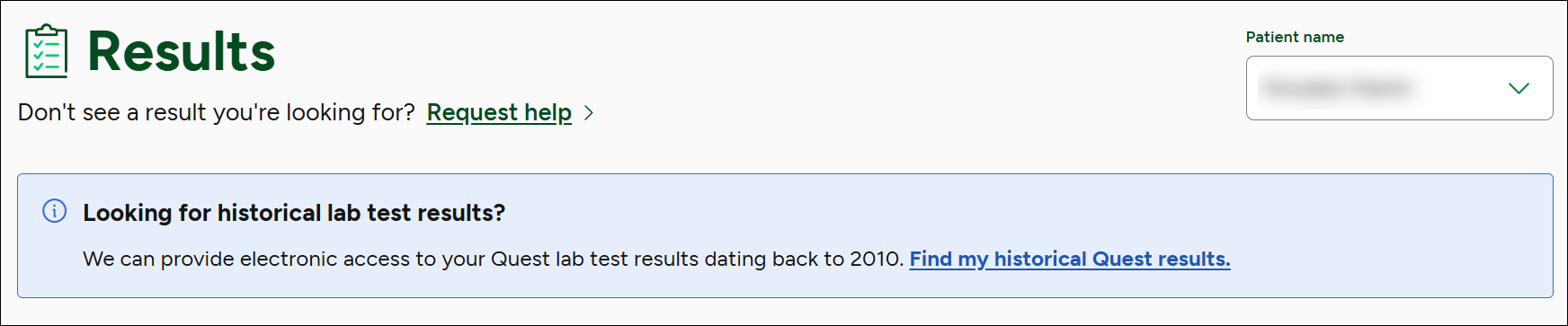
If you don’t see tests from your lab order within approximately a week of sample collection, go to your Test Results page. Next to Don't see a result you're looking for?, click Request help.
Next, follow the instructions to request your lab results.
|
Note: If your account didn't automatically import your entire test results history, you will see the following message:
To have those older results (dating back to January 1, 2010) imported, click Find my historical Quest results. If you don't see this option, your account is up to date and you don't have any additional electronic lab results. |
Certain historical lab test results may not be available in electronic format in MyQuest. If you need to obtain a printed lab test result, you can submit a written request using the Patient Request to Access or to Disclose Protected Health Information (PHI) (Access Form) in English or Spanish.
Patient access forms can be submitted as follows:
Mail: Quest Diagnostics
9601 Renner Blvd
Lenexa, Kansas 66219
ATTN: Clinical Client Services
Fax: 1.855.854.9151
Email: [email protected] [not recommended if unencrypted]